Aside, the AI Browser That Works Across Sites You're Signed Into: How Far Does the Free Tier Go?
A five-story news roundup took 25 seconds and 29 credits. Here is what we found hands-on, how to plug in a ChatGPT or Claude subscription, and how to drive it from the terminal and your coding AI.

If you are a Mac user who spends a lot of time hopping between sites you are already logged into, gathering material and organizing it, Aside is worth a look. Give it a job in Korean and it can hand the result back as a table. As for how much you get for free: based on the news-roundup task we timed ourselves, it works out to roughly 15 to 17 runs per month. If you connect a ChatGPT or Claude subscription you are already paying for, you get a lot more room.
What Aside is
Aside is an AI browser that reads web pages, clicks buttons, and even handles files. When you want to ask about the page in front of you, you use a panel docked to the side of the screen; when you need to work across several sites and files at once, you use a task page. According to Aside, saved passwords are never shown to the AI, and are typed into sites automatically instead.
People who hit a wall at the login step while trying to drive a browser with Claude Code, the coding AI, say that with Aside they could simply reuse sessions they were already logged into. On the other hand, some users report that the app feels heavy or that logins keep dropping.
Installing it is simple
It runs on macOS 15.0 or later and requires an Aside account. Download the Mac installer from the official site and drag it into your Applications folder, and you are done.
The Download for macOS button in the middle of the official homepage (captured by the reporting team, clarity enhanced with AI)
We tried it: 25 seconds and 29 credits for a five-story news roundup
On September 28, 2026, we installed Aside 1.0.922.1 and opened Hacker News, the tech news board. With the current page registered as a reference in the side panel, we typed a request in Korean: “From this page, pick just five AI-related posts and organize them into a table with the title, a one-line summary, and the link.”
As soon as we sent the request, a timer appeared and the job started running. 25 seconds later, the chat tab showed five AI posts laid out in a table with titles, one-line summaries, and links to the originals. Credits are the usage unit that gets deducted when you run a task in Aside. Adding up the six line items attached to this task on the usage screen came to 29 credits. We ran the same request a second time and it took 23 seconds and 32 credits. Even for the same job, the credit cost shifts a little each time.
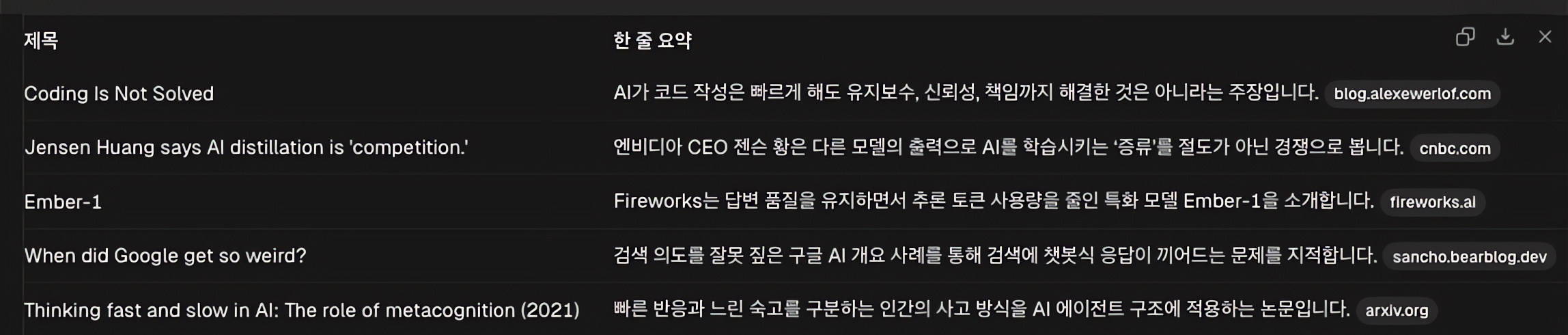
25 seconds later, five AI posts appeared as a table of titles, one-line summaries, and source links (captured by the reporting team, clarity enhanced with AI)
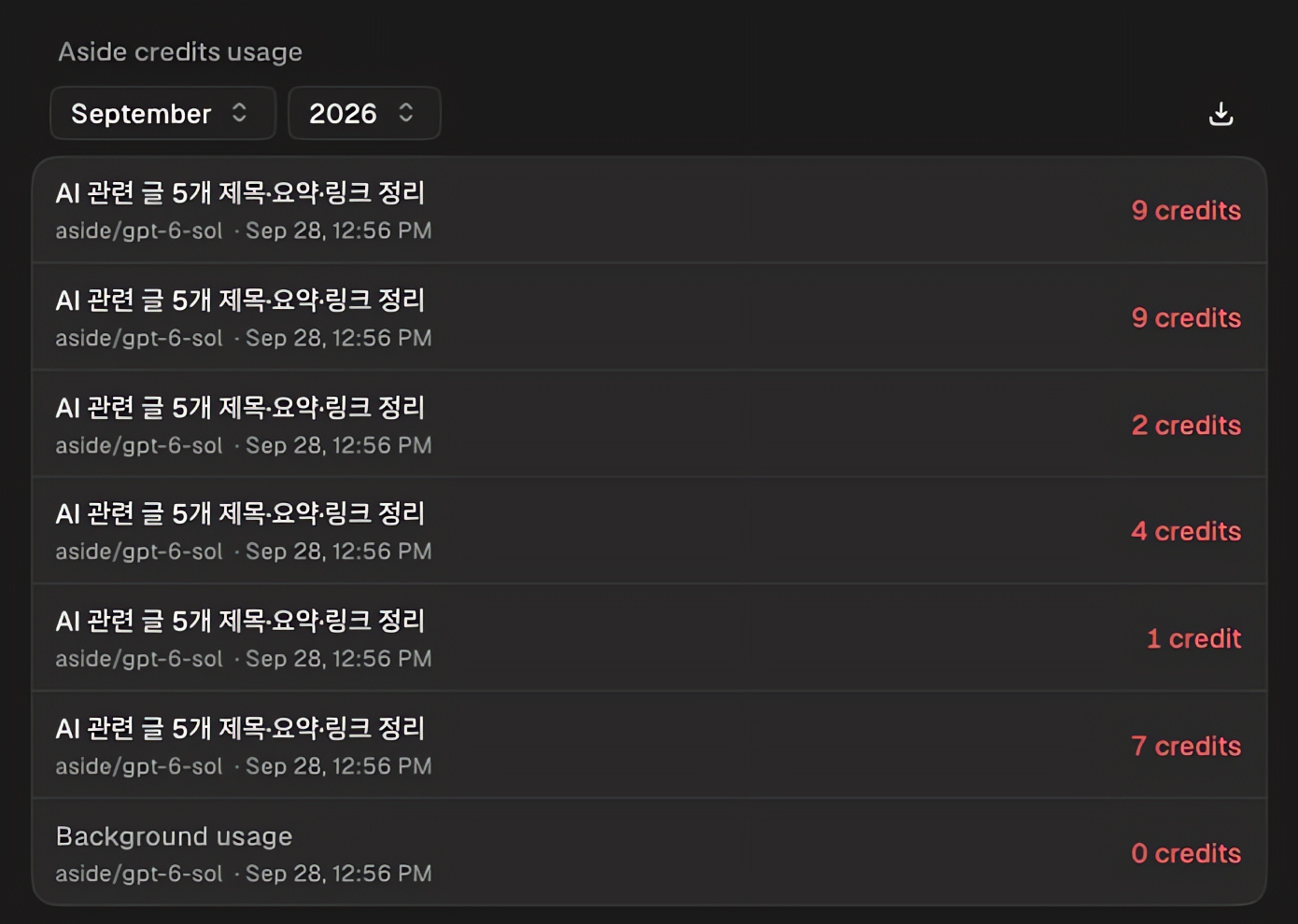
The usage screen in settings. The step-by-step credit deductions from running the same news roundup again (32 credits total) (captured by the reporting team, clarity enhanced with AI)
For the second test, we opened Anthropic’s and OpenAI’s pricing pages side by side and asked for a table comparing the price of each company’s cheapest model. 22 seconds later, a table comparing the pricing of GPT-6 Luna and Claude Haiku 4.5 came back, with source links attached. That task cost 16 credits. The table looked cramped in the side panel, so we moved over to the chat tab to read it.
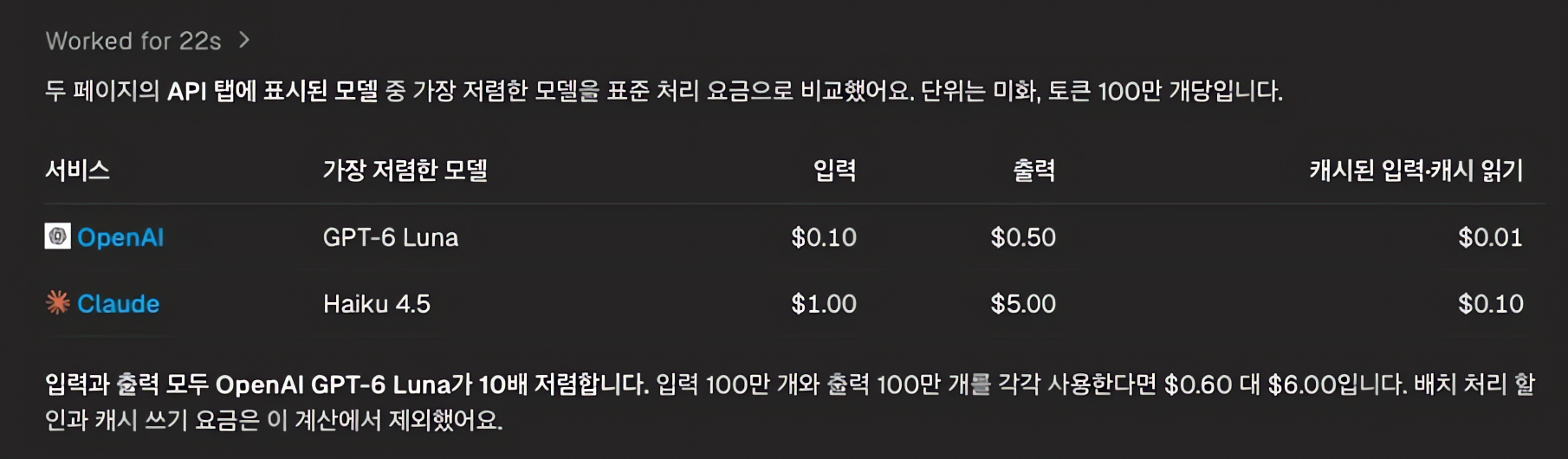
The results table comparing the two companies’ pricing pages. Source links are attached (captured by the reporting team, clarity enhanced with AI)
The two tasks were only three seconds apart in run time, but 13 credits apart in cost. The news roundup, which involves opening and reading several articles, used about 1.8 times as many credits as the pricing comparison.
What people are using it for
- Organizing personal records: Pulling Coupang order histories into a table of order date, product, amount, and delivery status, or summarizing changelogs for AI services. (Coupang is a major Korean e-commerce platform.)
- Migrating and fixing posts: One user moved 110 posts from Brunch to Naver Blog, both Korean publishing platforms. Another reported fixing stale links and images across 306 posts published on three different services in one pass. Neither service offers a public API for this kind of work, so using an already logged-in browser was what made it possible. That said, there were slip-ups, including a few missing links and unpublished drafts that got made public.
- Logs and statistics: Reported uses include tracking down the URLs of LinkedIn posts to grow a Notion log from 477 entries to 630, and collecting view counts from several social networks into a CSV file for a spreadsheet.
- Running a video channel: One user handed over YouTube channel setup and video publishing; Aside finished five of the six items and scheduled a retry the next day for the one that failed.
- Photos and admin chores: Some backed up and then deleted 11GB of old photos and videos from Google Photos; others handed off refunds and subscription cancellations.
On Reddit, common praise includes “faster than Comet” and “great that I can bring over the Claude and ChatGPT subscriptions I already use.” Complaints include the 500 free credits being too few, the app feeling heavy, occasional freezes and dropped logins, and the lack of sync across devices.
Ways to put it to work
Schedule a morning news summary. In the Routines menu under settings, you enter a title, a time, and the request you want repeated, and it reruns the same job at the set hour. We went as far as the setup screen for a routine that summarizes five AI posts from Hacker News at 9 a.m. daily. The free plan allows up to three routines.
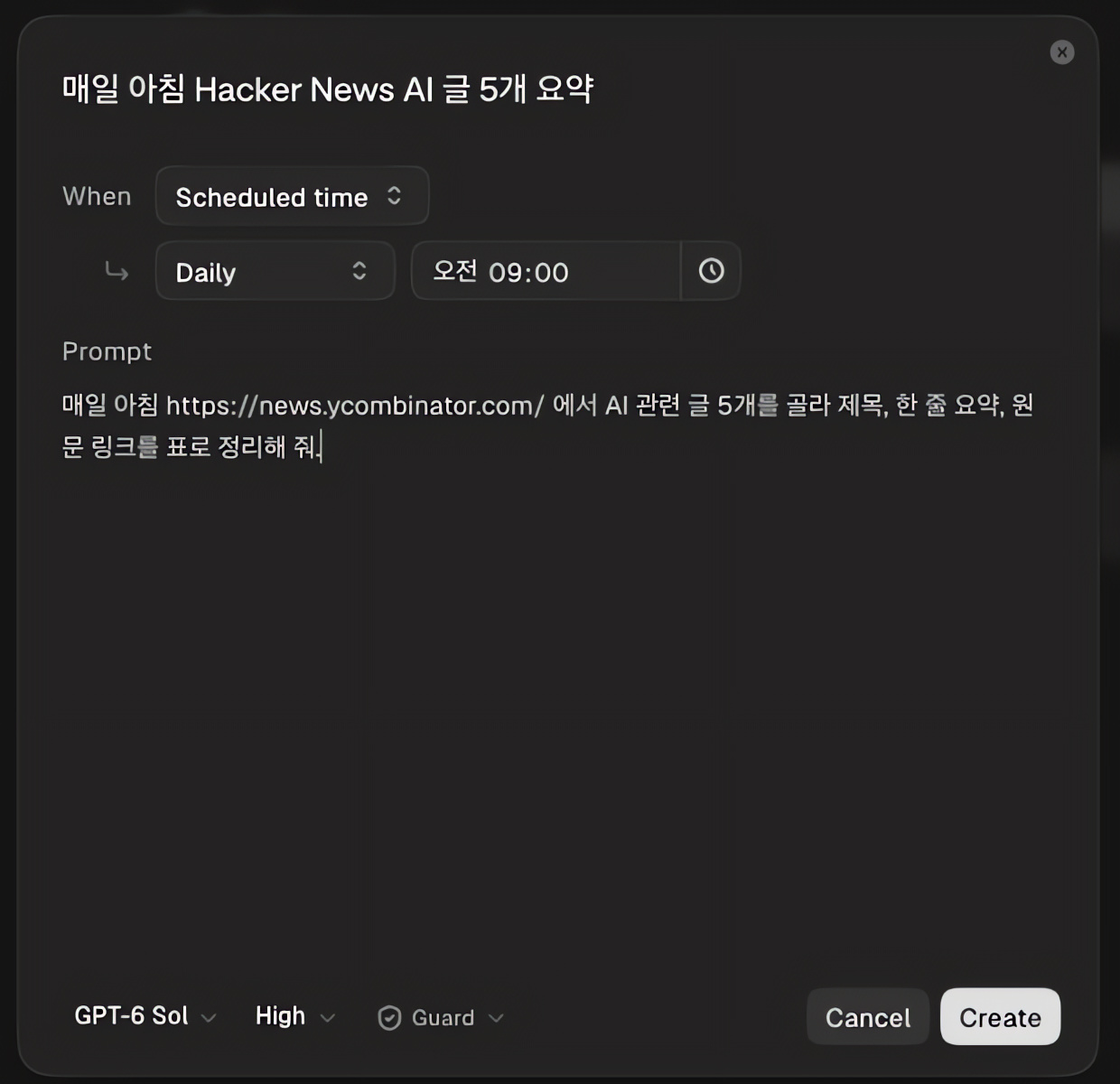
The routine creation screen. We set the same request to repeat daily at 9 a.m. (captured by the reporting team, clarity enhanced with AI)
Call it from the terminal. Aside also ships a CLI you drive with commands. To install it, paste this single line into a terminal.
curl -fsSL https://releases.aside.com/install.sh | bash
Our install finished in 3 seconds, and because we were already signed in to the app, the CLI picked up the same account. From Claude Code’s terminal, we made the following request in Korean:
aside "네이버 뉴스 IT/과학 섹션에서 AI 관련 기사 5개를 골라 제목, 언론사, 한 줄 요약, 링크를 표로 정리해 줘. 읽기만 하고 버튼은 누르지 마."
In English, that reads: “From the IT/Science section of Naver News, pick five AI-related articles and organize them into a table with the title, publication, a one-line summary, and the link. Only read; do not click any buttons.” 59 seconds later, it had opened and read each of the five articles and returned a table with titles, publications, summaries, and links. It handled Korean-language requests and Korean sites without trouble. If you have built your own data collection tool or run a daily script, you can hand the web-browsing step over to this one command.
Hand browser work to your coding AI. Through MCP, the connection standard that lets an AI call outside tools, you can attach Aside to Claude Code, Codex, and Cursor. For Claude Code, the single line claude mcp add aside -- aside mcp does it, or you can connect it with a button under Settings > Developers in the app. Once connected, you get three tools: assigning jobs on logged-in sites, directly manipulating tabs and the screen, and searching Aside’s memory. For example, after your coding AI edits code, you can have it open a login-protected admin or deployment screen through Aside to verify the result.
Bundle up your launch checks. You can have it walk through the signup flow on a site you are building, capture the screens, and write up inspection notes. One of the examples Aside highlights is a routine that opens the admin dashboard every 30 minutes after a deploy and logs the error rate.
How to write the request
| Weak request | Strong request |
|---|---|
| Summarize the news for me | From the current page, build a table with the titles, one-line summaries, and links for five AI posts. |
| Find the cheapest model | Compare the input and output prices on the two pricing pages per 1 million tokens, and list discount conditions separately. |
| Move my blog posts | Draft the migration for only the public posts I specify and keep the original links. Do not publish; wait for my confirmation. |
Spell out what you are targeting, what shape you want the result in, and where it should stop and check with you, and the results stay consistent.
How far the free tier goes
As of September 28, 2026, the free plan gives you 500 credits a month and three routines. Pro costs $20 a month for 1,500 credits, removes the routine limit, and includes Ultrabrowse, a research feature that digs through many sources over a longer stretch. Max runs $200 a month for a far larger allowance.
Assuming the costs we measured hold steady, 500 free credits buys 15 to 17 news roundups or 31 pricing comparisons. Do the news roundup every day and you will burn roughly 900 credits a month, well past the free ceiling. Since the deduction for each task shows up on the usage screen in settings, it is worth spending the first few days measuring what your own work actually costs.
How to connect a ChatGPT or Claude subscription
This is the part readers will be most curious about. Even on the free plan, you can connect an AI subscription you already pay for.
- Go to Settings > Models and click Connect.
- From the Subscription list, pick one of ChatGPT (Plus, Pro), Claude (Pro, Max), or GitHub Copilot.
- Authorize with that service’s account in the login window that pops up, then return to Aside.
- In Task models under the same menu, switch the default model used for tasks to the subscription model you just connected.
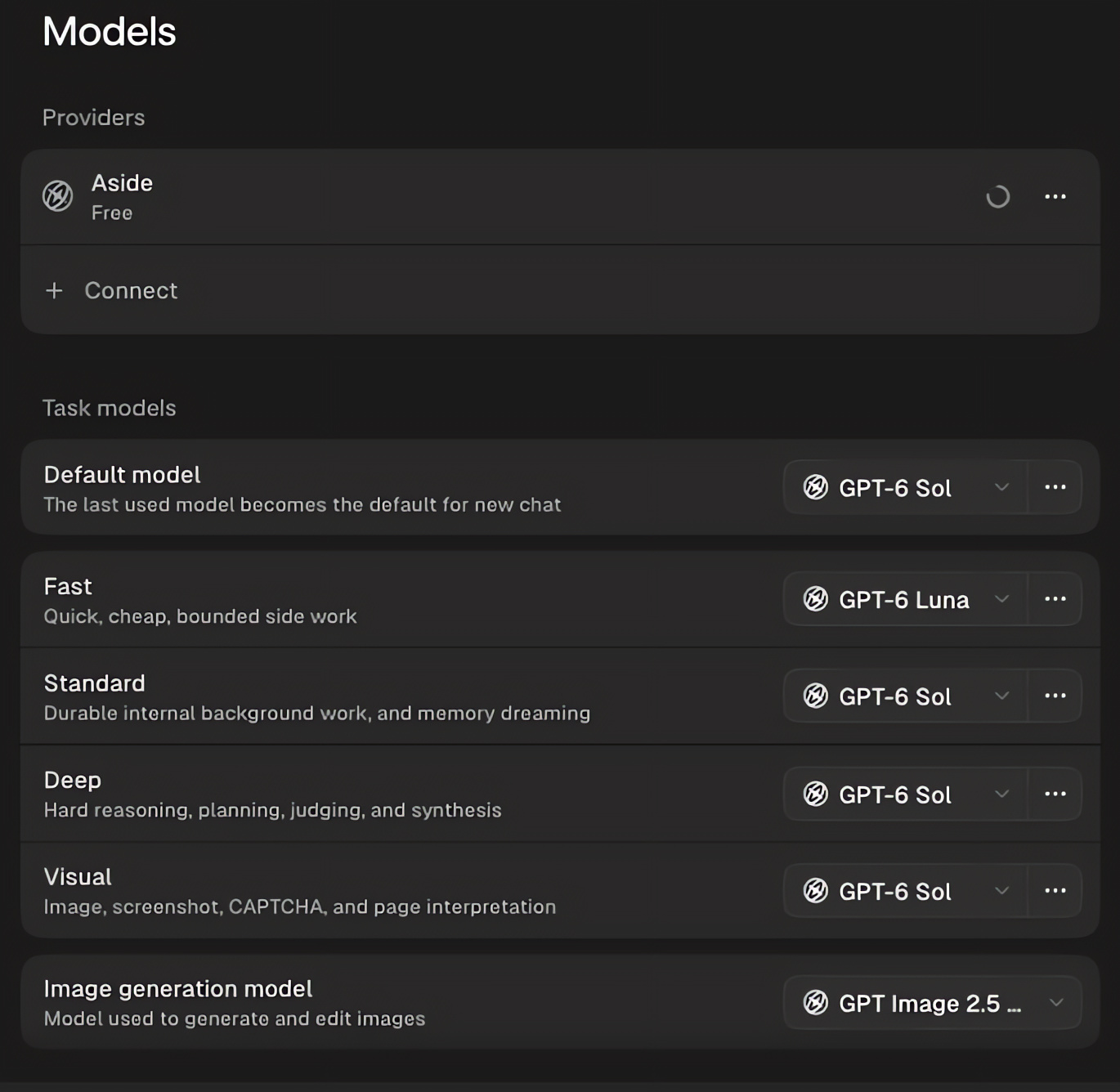
The models screen in settings. Click Connect to link a ChatGPT or Claude subscription, then choose per-task models below (captured by the reporting team, clarity enhanced with AI)
Is a subscription alone enough? For the lookup, summary, and organizing work most people do, generally yes. When you run tasks on a connected subscription model, the usage is drawn from that subscription, and several Reddit users say they stay on the free plan with just a subscription attached. Three caveats, though. First, if you want four or more routines or access to Ultrabrowse, you need Aside Pro regardless of your subscription. Second, ChatGPT and Claude subscriptions have usage limits that refill on a multi-hour cycle, so cramming long jobs together can run you into that limit first. Third, Anthropic states that usage from third-party apps also counts against your Claude subscription limit, but it moved to change the rules for using subscriptions in outside apps once this year before putting that on hold, so this could shift.
There is also the option of entering a developer API key instead of a subscription. Register a key from Anthropic, OpenAI, Google, xAI, or others in the same menu, and that provider bills your account for whatever you use.
What to know before you start
Permissions are set in the Agents menu under settings. By default, it asks you before touching anything outside the folders you have allowed. Set to read-only, it cannot modify files; set to full access, it can read and write any file on your computer. For payments, publishing, sending messages, and bulk deletions, the safe approach is to write into your request that a human must confirm before it proceeds.
You can also have it publish posts or create accounts. Keep in mind, though, that some sites’ terms of service restrict automation, so check the target site’s conditions first and tread carefully. Task logs are stored on your own machine, but the necessary content is passed along to the AI model doing the work and to the sites it visits.
The bottom line
Aside is a browser for handing off repetitive web work on sites you are already logged into. Use the free 500 credits to measure what your own tasks cost and how accurate the results are, and if that runs short, connect the AI subscription you already have to stretch it further.